On the Sale screen, tap the Settings button ( ).
).
On the main menu, tap Reports.
The Product Summary report displays a summary of product sales within a date range.
On the Sale screen, tap the Settings button ().
On the main menu, tap Reports.
The list of reports appear on the right pane.
Tap Previous Totals.
The report results appear in the right pane.
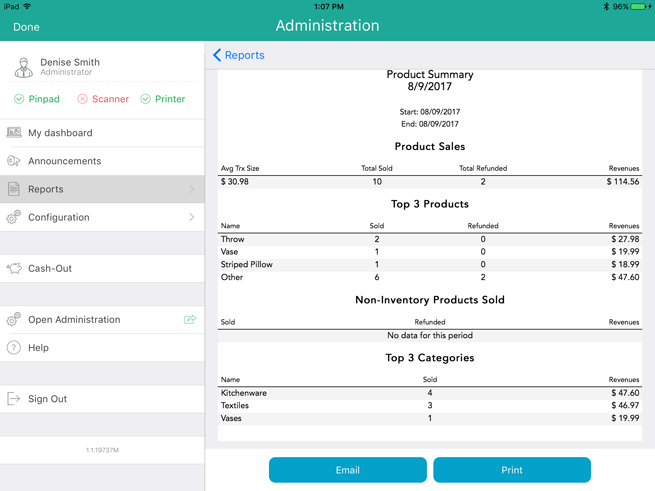
The report displays the following information:
Product Sales
Avg Trx Size - The result of the total dollar amount of products sold divided by the number of transactions.
Total Sold - a total quantity of products sold within the date range.
Total Refunded - a total quantity of products refunded/returned within the date range.
Revenues - This is the result of the following calculation; Product retail price x Quantity sold minus Refunded price x Refunded quantity. For example; 5 items sold at $2 each = $10, minus 2 items refunded at $3 each = -$6 therefore total revenue is $4.
Top 3 Products
Name - the name of the top 3 product sold within the date range.
NOTE: "Other" refers to other products sold that are not included in the top 3.
Sold - the quantity of the top 3 products sold within the date range.
Refunded - the quantity of the top 3 products refunded/returned within the date range.
Revenues - This is the result of the following calculation; Product retail price x Quantity sold minus Refunded price x Refunded quantity.
Non-Inventory Products Sold
Sold - the quantity of any non-inventory products sold within the date range.
Refunded - the quantity of any non-inventory products refunded/returned within the date range.
Revenues - This is the result of the following calculation; Product retail price x Quantity sold minus Refunded price x Refunded quantity.
Top 3 Categories
Name - the names of the top 3 product categories sold within the date range.
Sold - the quantity of the top 3 product categories sold within the date range.
Revenues - This is the result of the following calculation; Product retail price x Quantity sold minus Refunded price x Refunded quantity.